
One of the scariest parts about investing is getting started—because a lot goes into it. You have to learn about different asset classes, platforms, market performance, and how comfortable you are with risk. Then there’s all the financial jargon that comes along with investing, which is another story entirely. It can feel like you’re learning a new language.
However, the Plynk app makes it much less daunting and simpler to start investing.
If you’re curious about how it works, learn more in my Plynk review. I’ll discuss this app’s features, pros and cons, fees, how it stacks up to competitors, and more.
- Plynk® is an effective yet beginner-friendly way to start investing in thousands of stocks, ETFs, mutual funds, and cryptocurrencies.
- Plynk charges no account opening fees, and you can start investing for as little as $1.
- Enjoy commission-free trades* on 5,000 stocks and more than 3,400 ETFs. Plynk also supports mutual funds and cryptocurrencies.
- Boost your yield with a cash match of 25% on dividend income.**
- Earn a 3.48% APY on uninvested cash.
- Track dividends and interest with Income Hub.
- Put your investing on autopilot with automated investing or Steady Start.
- Just getting started? Simulated trading and virtual portfolios help you get your feet wet and build experience without putting any money at risk.
- No account fees
- Smart design and smooth user experience
- Fractional shares
- Designed for beginning investors
- Virtual portfolios and simulated trading
- Earn interest on uninvested cash
- One of the best automated investing programs we've seen (Steady Start)
- Elite educational resources and tools
- Lacks features such as options trading and advanced charting that more experienced traders prefer
Table of Contents
What Is Plynk?
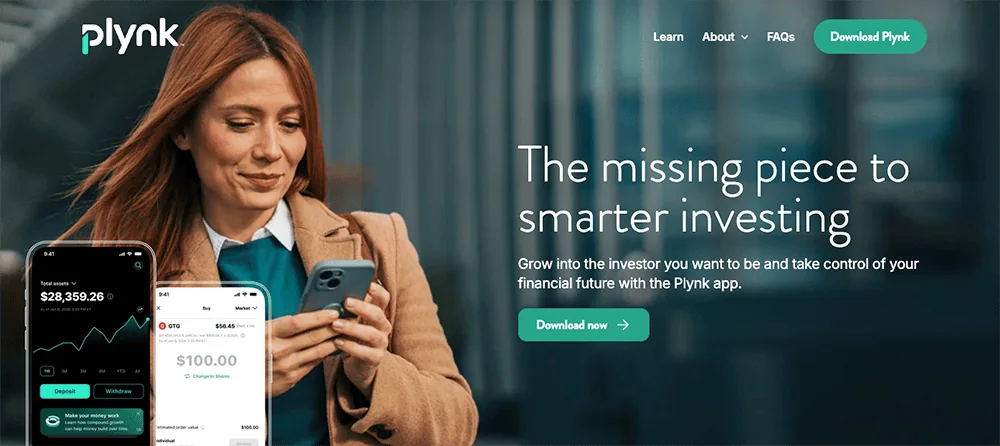
Plynk, launched in 2021, is an investment app designed to help simplify investing. The Plynk app is available for Android and Apple devices and aims to support new investors as they start investing for their futures.
Users can invest in exchange-traded funds (ETFs), mutual funds, stocks, and cryptocurrency through Plynk.
Related: The 13 Best Investment Apps for Beginners
How Plynk Accounts Work
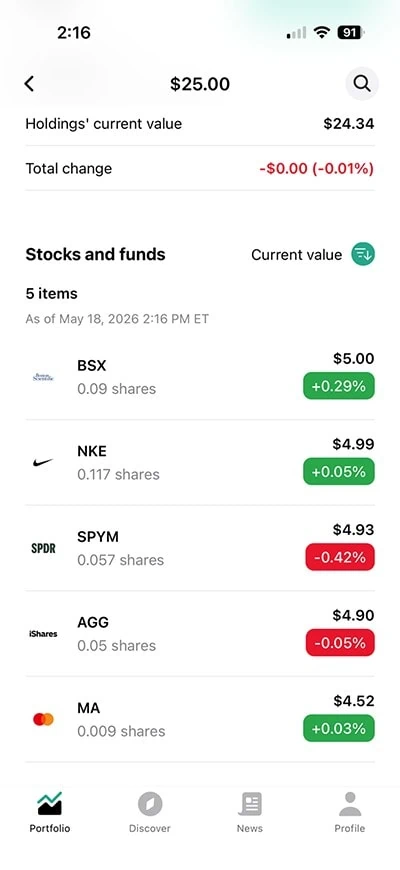
When you sign up with Plynk, you’re opening either a taxable brokerage account or an individual retirement account (IRA).
Taxable brokerage accounts are among the most flexible investment accounts you can own. You can use Plynk to invest in ETFs and mutual funds, which allow you to own dozens, hundreds, and even thousands of stocks, bonds, and other assets within a single investment—an important investment benefit called “diversification.” Users also can invest in the stocks of individual companies through Plynk. So if you’ve ever dreamed of owning a piece of Apple (AAPL) or Target (TGT), this app has you covered.
Plynk’s IRAs are equally as flexible, plus they enjoy tax advantages. In a traditional IRA, you’re only taxed upon withdrawal; in a Roth IRA, you’re contributing after-tax money, so you generally won’t pay taxes on withdrawals made in retirement.
There’s no minimum deposit required to open a Plynk account, and it takes a mere $1 deposit to begin investing.
Plynk Invest’s Features
Commission-Free Investing for Stocks, ETFs, and Mutual Funds
Plynk offers commission-free trading, which means you won’t pay a fee when you buy or sell an asset. This can be a valuable cost savings, especially if you don’t have a lot of money to invest. And while commission-free stock and ETF trading are pretty routine in the brokerage space, many investing apps still charge fees for mutual fund trades—but Plynk doesn’t.
Related: 13 Best Stock Trading Apps + Platforms for Beginners
Virtual Portfolios
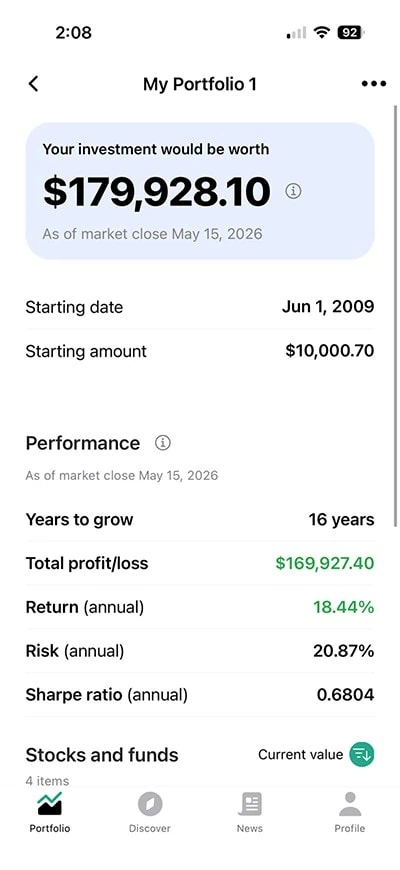
Curious about how certain investments would’ve worked? Plynk’s virtual portfolios let you “invest” virtual money to see how any portfolio you can think up would have performed depending on when you started investing in its underlying stocks and ETFs.
You can even build experience without using real money thanks to the app’s simulated trading feature, which shows you how to buy and sell stocks and funds, and lets you test out your trading strategies.
Expert Ratings
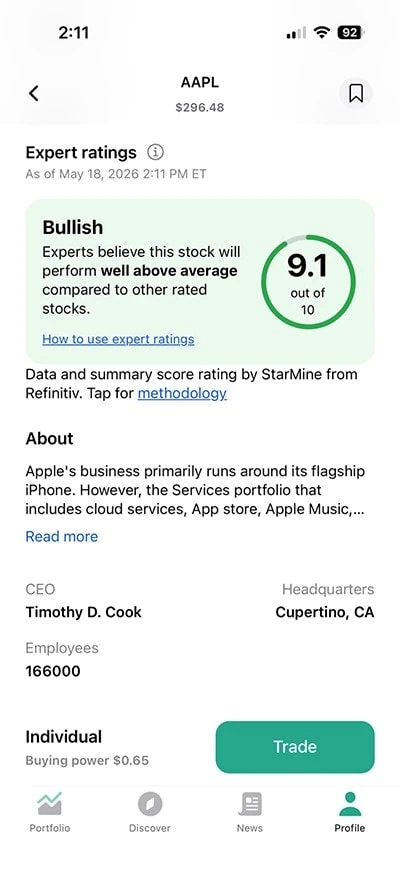
Plynk users enjoy access to expert ratings of investments, which can be especially helpful for beginners who aren’t sure about their own stock-picking skills. These ratings provide insight into the performance of both stocks and funds, so you can feel more confident in all of your investment choices.
Related: 14 Best Investing Research & Stock Analysis Websites
Income Hub
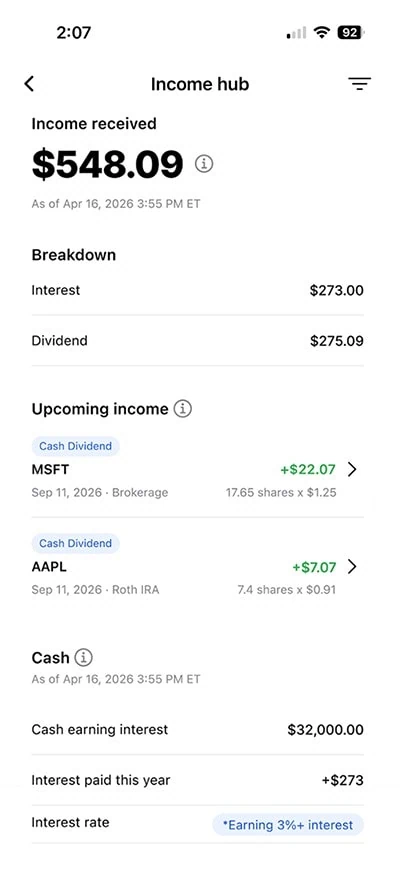
Plynk can also show you how much income you’ve collected via the Income Hub. Track dividends from your stock investments, interest income from bonds and other debt investments, and any interest earned on idle cash. (Check the box below for the current APY on uninvested cash.)
Automatic Investing + Steady Start
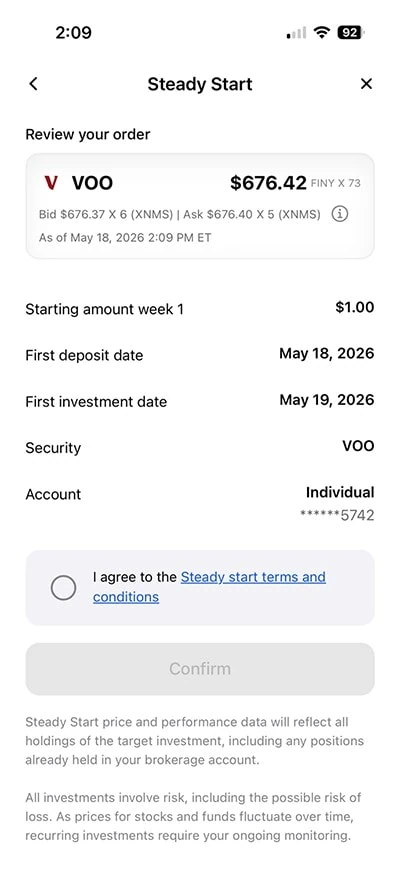
Want to start building good investing habits right off the bat? The Plynk app offers automatic investing—you choose how much you want to invest, in which securities, and how often, and the app processes the trading from there.
Want help building a consistent habit? Plynk’s Steady Start feature is a 52-week ramp-up program that starts your contribution at $1 in the first week, then ups that contribution by a dollar each week—so by the time you’re done, you’ll have contributed $1,378 in a year.
Related: The 12 Best Budgeting Apps We’ve Reviewed
Plynk Crypto
Plynk Crypto is a new crypto account separate from your Plynk brokerage account. It is offered through Paxos Trust Company and allows you to trade four cryptocurrencies inside your Paxos crypto account: Bitcoin, Litecoin, Ethereum, and Bitcoin cash. And before you start trading, Plynk provides quick explainer articles on each cryptocurrency offered, in addition to the general articles highlighting important information about crypto investing.
(Editor’s Note: When I look inside the app, I notice they grant considerable screen real estate toward the educational components before actually showing an option to get started with opening your Paxos crypto account. This shows considerable attention and care being given to this often risky alternative investment.)
Paxos has a two-tier transaction fee that’s cheaper than many other crypto competitors. If you buy or sell $100 or more worth of a supported cryptocurrency, the platform levies a 0.5% transaction fee—so if you bought $500 worth of crypto, you’d pay $2.50. For each crypto trade of under $100, you pay a minimum fee of 50 cents. So, smaller trades have a higher transaction fee as a percentage of the overall trade value.
If you trade crypto on Plynk, you cannot transfer your crypto assets from your account to any other crypto asset wallet. Paxos custodies your crypto assets on your behalf but will leave any fiat currency in your Plynk account. Also, if any forks or airdrops occur and Paxos doesn’t support the crypto asset, the unsupported crypto asset will be accounted for as belonging to Paxos.
Earn Interest on Idle Cash
Plynk defaults all uninvested cash into a taxable interest-bearing cash option (“GCASH”) held by Green Pier Fintech LLC, an affiliated clearing broker.
The interest rate, like most savings accounts, is variable.
- Plynk® is an effective yet beginner-friendly way to start investing in thousands of stocks, ETFs, mutual funds, and cryptocurrencies.
- Plynk charges no account opening fees, and you can start investing for as little as $1.
- Enjoy commission-free trades* on 5,000 stocks and more than 3,400 ETFs. Plynk also supports mutual funds and cryptocurrencies.
- Boost your yield with a cash match of 25% on dividend income.**
- Earn a 3.48% APY on uninvested cash.
- Track dividends and interest with Income Hub.
- Put your investing on autopilot with automated investing or Steady Start.
- Just getting started? Simulated trading and virtual portfolios help you get your feet wet and build experience without putting any money at risk.
- No account fees
- Smart design and smooth user experience
- Fractional shares
- Designed for beginning investors
- Virtual portfolios and simulated trading
- Earn interest on uninvested cash
- One of the best automated investing programs we've seen (Steady Start)
- Elite educational resources and tools
- Lacks features such as options trading and advanced charting that more experienced traders prefer
Plynk’s Pros
- Easy for beginners to get started
- No minimum required to open a new account
- Can start investing with as little as $1
- Commission-free trading on stocks, ETFs, and mutual funds
- Expert ratings available
Plynk’s Cons
- Limited investment selections compared to other apps (no options trading, futures, nor individual bonds, for instance)
- No desktop platform available; exclusively a mobile app
Plynk’s Fees
While Plynk offers commission-free trading, certain fees apply depending on what you invest in and how you use the app.
Plynk charges fees for specific actions, such as wire transfers ($15), stopped payments ($15), and bounced checks ($15). If you buy crypto through its partner platform Paxos, transaction fees of 0.5% (or 50 cents on trades under $100) apply as well. So, for instance, if you want to buy $1,000 worth of Bitcoin, you’ll pay $5 for your purchase.
Related: 9 Apps With Free Stocks for Signing Up [Get Free Shares]
Who Is Plynk Best For?
The platform focuses specifically on beginner investors, so Plynk is best for those who don’t have much (or any) experience with investing. It’s an intuitive app that provides several helpful learning tools, so you can cut through the jargon and figure out your investment strategy as you go.
That said, the platform offers more than enough in features to appeal to intermediate investors, too.
If you’re seeking a straightforward investment app offering stocks, ETFs, mutual funds and limited crypto options without too many bells and whistles, you might appreciate what Plynk offers. The interface isn’t fancy and doesn’t have advanced investment tools, but it’s a good option if you’d like something simple.
And Plynk is suitable for those who don’t have much money to invest, regardless of their experience level—the Plynk app itself is free, and you can start investing with as little as $1.
Who Is Plynk Not For?
Plynk isn’t a good option for advanced investors seeking advanced investment tools or trading options, as the app would likely be too beginner-focused for these individuals. If you’d like in-depth stock market research, charting tools, or access to margin trading, this isn’t the app for you.
If you’re a more advanced investor or day trader, you might be better off with apps including Schwab, E*Trade, TradeStation, and Interactive Brokers, among others.
Plynk vs. Competitor Apps
If you’re wondering how the Plynk app stacks up to competitors in terms of fees, minimum investment requirements, features, and more, we’ve got you covered. Here’s a look at how it compares to popular investment apps Betterment, Acorns, and Wealthfront.
Plynk | Betterment | Acorns | Wealthfront |
|
|---|---|---|---|---|
| Fees | None | $5/mo. or AUM fee charged based on balance*; Premium: 0.65% annual AUM fee. | Bronze: $3/mo. Silver: $6/mo. Gold: $12/mo. | 0.25% annual AUM fee |
| Minimum to start investing | $1 | $10 | $5 | Stock Investing Account: $1. Automated investing: $500 |
| Investment options | Stocks, ETFs, mutual funds, and crypto | ETFs | Stocks, ETFs | Stocks, ETFs |
| Platform availability | Mobile (Android and iOS) | Desktop, mobile (Android and iOS) | Desktop, mobile (Android and iOS) | Desktop, mobile (Android and iOS) |
| Best for | Beginners and intermediate investors | Hands-off investors | Families | All-in-one money management |
 | | | |
|
| * 0.25% annual AUM fee if you set up recurring monthly deposits of $200 or more, or on a balance of $24,000 to $1M across all Betterment accounts. AUM fee shrinks to 0.15% on balances between $1M and $2M, and 0.10% on balances over $2M. | ||||
Related Questions About Plynk

Who owns Plynk?
Plynk is owned by FMR LLC, a major U.S. financial services corporation.
Is Plynk a secure app?
Plynk is a service of Digital Brokerage Services LLC, a broker-dealer regulated by the Securities Exchange Commission (SEC), and a member of the Financial Industry Regulatory Authority (FINRA). Plynk follows rules and regulations set by both the SEC and FINRA to act fairly and transparently to protect all investors.
The app uses sophisticated security technology that also requires identity verification to protect users from fraud, and it employs other security methods, like one-time passcodes sent to your phone when you take certain actions, such as opening an account or changing your password.
What do you need to open a Plynk brokerage account?
To open a Plynk brokerage account, you’ll need to be at least 18 years old. You will also need to have an Android or iOS mobile device, as the app is not available for desktop users.
Additionally, Plynk collects certain personal information when you open a new account. For instance, you’ll be required to provide your phone number, Social Security number, and address. This information is required to help verify your identity and keep you safe from fraud.
What is Digital Brokerage Services, LLC?
Digital Brokerage Services, LLC is a brokerage firm that provides brokerage accounts for the Plynk app. It is registered with FINRA and authorized to do business in buying and selling securities.
How old do you need to be to use Plynk?
You’ll need to be at least 18 to open an account with Plynk. This age requirement is fairly standard with most investment accounts. If you’re under 18 and interested in investing, talk to your parents about custodial accounts and research your options.
- Plynk® is an effective yet beginner-friendly way to start investing in thousands of stocks, ETFs, mutual funds, and cryptocurrencies.
- Plynk charges no account opening fees, and you can start investing for as little as $1.
- Enjoy commission-free trades* on 5,000 stocks and more than 3,400 ETFs. Plynk also supports mutual funds and cryptocurrencies.
- Boost your yield with a cash match of 25% on dividend income.**
- Earn a 3.48% APY on uninvested cash.
- Track dividends and interest with Income Hub.
- Put your investing on autopilot with automated investing or Steady Start.
- Just getting started? Simulated trading and virtual portfolios help you get your feet wet and build experience without putting any money at risk.
- No account fees
- Smart design and smooth user experience
- Fractional shares
- Designed for beginning investors
- Virtual portfolios and simulated trading
- Earn interest on uninvested cash
- One of the best automated investing programs we've seen (Steady Start)
- Elite educational resources and tools
- Lacks features such as options trading and advanced charting that more experienced traders prefer
Disclosures
All Plynk disclosures can be viewed here.